Python Programming for Beginners: History, Features, Applications & Installation Guide
History of Python
Python was created by a programmer named Guido van Rossum.
In the late 1980s, Guido was working at a research center in the Netherlands. During a holiday season, he wanted to build a programming language that was:
-
Easy to read
-
Simple to write
-
Powerful enough for real work
At that time, most programming languages were complex and difficult, especially for beginners. Guido wanted a language that felt natural and stress-free, just like reading English.
So in 1991, he officially released Python to the public.
Why is it Called “Python”?
Many people think Python is named after the snake, but that’s not true.
Guido was a big fan of a comedy TV show called “Monty Python’s Flying Circus”.
He wanted a fun and short name, so he chose Python.
That’s also why Python examples often look fun and friendly.
Growth of Python Over the Years
When Python was first released, it was mainly used for small scripts and automation.
But over time:
-
Developers loved its simplicity
-
Companies started using it
-
New libraries were created
Python slowly grew into a powerful language used in:
-
Web development
-
Data science
-
Artificial Intelligence
-
Machine Learning
-
Automation
Today, Python is one of the most popular programming languages in the world.
Why Developers Love Python
Python was created with one main idea:
“Code should be easy for humans to understand.”
That single idea made Python special and successful.
What is Python?
For example:
This line simply tells the computer to display a message on the screen.
Python is Case-Sensitive
Python is a case-sensitive programming language, which means it treats uppercase and lowercase letters as different.
In Python:
-
nameandNameare not the same -
printandPrintare different
Example:
Here, Python gives an error because name and Name are considered two different variables.
Why Python is Popular?
Python is popular because it makes life easier for programmers.
You don’t need to write long or complex code.
With Python, you can do more work using fewer lines of code.
People love Python because:
-
It is very easy to learn, even if you are new to coding
-
It saves time and effort
-
It is free and open for everyone
-
It has a huge community ready to help
That’s why students, professionals, and big companies all use Python.
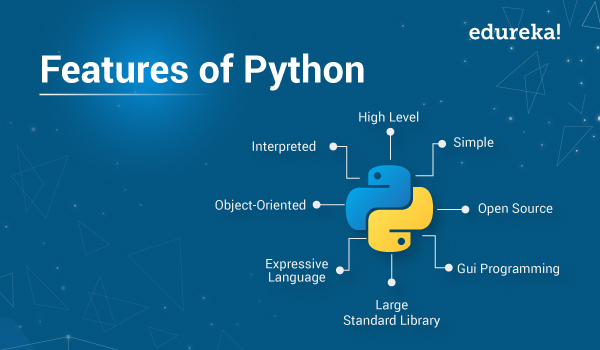
Features of Python
Python has many powerful features that make it one of the most loved programming languages in the world.
Let’s understand them in a simple and human way.
1. Easy to Learn and Use
Python is very easy to read and write because it looks like normal English.
You don’t need to remember complex symbols or rules.
This makes Python perfect for beginners.
2. High-Level Language
Python is a high-level language, which means you don’t have to worry about memory management or hardware details.
You just write logic, and Python takes care of the rest.
3. Interpreted Language
Python is an interpreted language, which means the code is executed line by line instead of converting the entire program into machine code at once.
When you run a Python program:
-
The interpreter reads one line
-
Executes it immediately
-
Then moves to the next line
Because of this, errors are easy to find and fix.
4. Dynamically Typed
Python is a dynamically typed language, which means you do not need to declare the data type of a variable before using it.
Python automatically understands the type of data based on the value you assign.
Example:
Here, you didn’t tell Python what type x is.
Python figured it out on its own.
5. Object-Oriented
Python supports object-oriented programming, which helps in:
-
Writing clean code
-
Reusing code
-
Organizing large programs
Concepts like class, object, inheritance,polymorphism,encapsulation,abstraction are supported.
6. Platform Independent
Python is a platform-independent programming language, which means the same Python code can run on different operating systems without any changes.
You can write a Python program on:
-
Windows
-
Linux
-
macOS
And run it on all of them.
Write once, run anywhere.
7. Free and Open Source
Python is free and open source, which means anyone can use it without paying money.
You can:
-
Download Python for free
-
Use it for personal or commercial projects
-
Modify the source code if needed
There are no license fees and no restrictions.
8. Huge Library Support
Python has a huge collection of libraries, which are pre-written pieces of code that help us perform tasks easily.
Instead of writing everything from scratch, we can simply use libraries to save time and effort.
What Libraries Do
Python libraries help in:
-
Web development
-
Data analysis
-
Machine learning
-
Artificial Intelligence
-
Automation
For example:
-
NumPy for calculations
-
Pandas for data handling
-
Matplotlib for graphs
-
Django for web applications
9. Large Community Support
Python has a very large and active community of developers around the world.
This means that millions of people use Python and are always ready to help and share knowledge.
In Simple Words
Python is:
-
Simple
-
Flexible
-
Powerful
-
Beginner-friendly
-
Industry-ready
That’s why Python is used everywhere today.
Applications of Python
Python is not just a language for learning—it is a language used in real life.
From small scripts to big software, Python is used in many fields because it is simple, flexible, and powerful.
Let’s see where Python is actually used.
Web Development
Python helps developers create websites and web applications.
Using Python, you can build:
-
Login and signup systems
-
Online forms
-
Dynamic and interactive websites
Because Python is easy to work with, creating websites becomes faster and smoother.
Data Science and Data Analysis
Data Science and Data Analysis are about understanding data and using it to make better decisions.
In today’s world, companies collect a huge amount of data every day.
Python helps to analyze this data and turn it into useful information.
Artificial Intelligence and Machine Learning
Python is one of the most popular languages for AI and Machine Learning.
It is used to create:
-
Chatbots
-
Recommendation systems
-
Face and voice recognition
Many smart technologies around us are powered by Python.
Automation and Scripting
Python can automate repetitive tasks and save a lot of time.
For example:
-
Automatically renaming files
-
Sending emails
-
Collecting data from websites
This helps people focus on more important work.
Game Development
Python can be used to create simple games.
It is great for beginners who want to learn:
-
Game logic
-
Basic animations
Many educational and small games are built using Python.
Cyber Security
Python is used in ethical hacking and cyber security.
Security experts use Python to:
-
Test system safety
-
Find vulnerabilities
-
Build security tools
Software Development
Python is also used to build:
-
Desktop applications
-
Simple software tools
These applications are easy to maintain and update.

Python vs Other Programming Languages
When starting programming, many people get confused about which language to choose.
Let’s compare Python with other popular programming languages in a simple and easy way.
Python vs C / C++
C and C++ are powerful languages, but they are harder to learn, especially for beginners.
-
C/C++ code is long and complex
-
You need to manage memory manually
-
Syntax is strict
Python, on the other hand:
-
Uses simple English-like syntax
-
Needs fewer lines of code
-
Is easier to understand and write
That’s why beginners prefer Python over C/C++.
Python vs Java
Java is widely used in big applications, but it requires more code and strict rules.
-
Java needs semicolons and brackets
-
Code is lengthy
-
Learning curve is higher
Python:
-
No semicolons
-
Clean and readable code
-
Faster development
Python is easier for beginners, while Java is often used in large enterprise systems.
Python vs JavaScript
JavaScript is mainly used for web development, especially on websites.
-
JavaScript runs inside browsers
-
Mostly used for frontend and web apps
Python:
-
Can be used for web, AI, data science, automation, and more
-
Has wider applications
Python is more versatile compared to JavaScript.
Installing Python (Windows / Linux / Mac)
Before writing Python programs, we need to install Python on our system.
Don’t worry — it’s very easy
Installing Python on Windows
Installing Python on Windows takes just a few minutes.
Steps:
-
Open your browser and go to python.org
-
Click on Download Python
-
Download the latest version for Windows
-
Open the downloaded file
-
IMPORTANT: Tick the option “Add Python to PATH”
-
Click Install Now
-
Wait for the installation to complete
After installation, Python is ready to use 🎉
Installing Python on Linux
Most Linux systems already come with Python installed.
To check:
Open Terminal and type:
If Python is not installed, you can install it using:
Python will be installed automatically.
Installing Python on macOS
macOS usually has Python, but it’s better to install the latest version.
Steps:
-
Go to python.org
-
Download Python for macOS
-
Open the installer package
-
Follow the installation steps
Once done, Python will be available on your system.
How to Check Python Installation
After installation, open Command Prompt / Terminal and type:
or
If you see the version number, Python is installed correctly ✅
Python IDLE Setup
When you install Python, Python IDLE is installed automatically.
What is Python IDLE?
Python IDLE is a simple editor that comes with Python and is best for beginners.
How to Open Python IDLE:
-
Windows: Search for IDLE in Start Menu
-
Mac/Linux: Open IDLE from applications
What You Can Do in IDLE:
-
Run Python commands
-
Write small programs
-
Practice basics easily
Example:
VS Code Setup for Python-Link
VS Code is a professional code editor used by developers.
Why VS Code?
-
Clean interface
-
Fast and powerful
-
Great for big projects
🔧 Steps to Setup VS Code for Python
-
Download VS Code from code.visualstudio.com
-
Install VS Code
-
Open VS Code
-
Go to Extensions
-
Search for Python
-
Install the Python extension
-
Restart VS Code
Now VS Code is ready for Python coding
Run Python in VS Code
-
Create a file named:
-
Write:
-
Click Run ▶️ or use Terminal
Your program will execute successfully.
Every expert programmer was once a beginner.
Start small, practice daily, and don’t fear mistakes.
With consistency and curiosity, Python can take you anywhere.
Start today — your coding journey begins now
-Codewithrohan
Comments
Post a Comment